A tour sells seats. At 10 a.m., the boat has 12 spots, and when 12 people book, it's full. The software only has to count.
A rental fleet doesn't work like that. You have six jet skis: one is in the shop, one came back with a cracked hood, and one is due for service after four hours of use. Six is the number on paper. Three is the number you can actually rent this afternoon.
Rental inventory management for fleets means tracking each unit, not each time slot. This post covers the difference, when a simple count is enough, and what rental inventory management software should do once your gear has engines.
Time slots vs units
Many booking tools were built for tours, so they track capacity per start time. A rental needs to know the state of each thing you hand over.
Question | Time-slot model | Unit model |
|---|---|---|
What does it track? | How many spots are left at each start time | Each unit's status: available, out, in maintenance, or retired |
What happens when one breaks? | Capacity stays the same until someone remembers to lower it | That unit drops out, and the rest stay bookable |
Where does damage go? | Nowhere, or on paper | On the record of the unit that came back damaged |
What about service? | Not tracked | Hours and service history on each unit |
How is turnaround handled? | The next slot starts on the hour | Buffer time after each return, set per unit |
What can you report on? | Bookings per time slot | Revenue and utilization per unit |
The time-slot model isn't wrong. It's built for a different business. When the thing you rent can break, run out of fuel, or need an oil change, the system has to know which one it is.
Count or individual unit: what each piece of gear needs
Not everything needs its own record. Twenty identical life jackets are fine as one line with a count of 20. A jet ski is not, because each one has its own hours, damage history, and service schedule.
A simple rule: if it has an engine, a battery, a registration number, or a repair history worth keeping, give it its own record. If one is interchangeable with the next, a count is enough.
Gear | Track as | Why |
|---|---|---|
Life jackets, helmets, paddles | A count | Interchangeable, low cost, no service history |
Kayaks and paddleboards | A count, or units if they differ | Track units once models, sizes or damage start to matter |
E-bikes and e-dirt bikes | Individual units | Battery health, mileage and repairs differ per bike |
Jet skis, UTVs and ATVs | Individual units | Engine hours, service intervals and damage per machine |
Boats and pontoons | Individual units | Engine hours, registration and maintenance history per hull |
Most fleets end up with both: machines as individual units, and the gear that goes with them as counted add-ons.
What rental inventory management software should do
- Give each unit a status. Available, out on rental, in maintenance or retired, visible at a glance and changed in one step.
- Calculate availability from everything that blocks a unit. Existing bookings, buffer time after returns, maintenance, blackout dates and minimum or maximum rental lengths.
- Handle counted gear and individual units in the same system. Machines as units, add-ons like helmets and life jackets as counts on the same booking.
- Let you swap a unit on a booking. When a machine goes down, moving its bookings to another unit should take seconds and recalculate the price if needed.
- Record condition at pickup and return. A checklist on the way out and a condition check on the way back, saved on that unit.
- Keep maintenance on the unit. Service history, engine hours, and the next service due, on the same record the booking system reads.
- Report utilization per unit. Which machines earn their keep and which sit on the dock.
- Retire units without losing history. A sold or written-off unit should leave the fleet but keep its records.
Where Renta fits
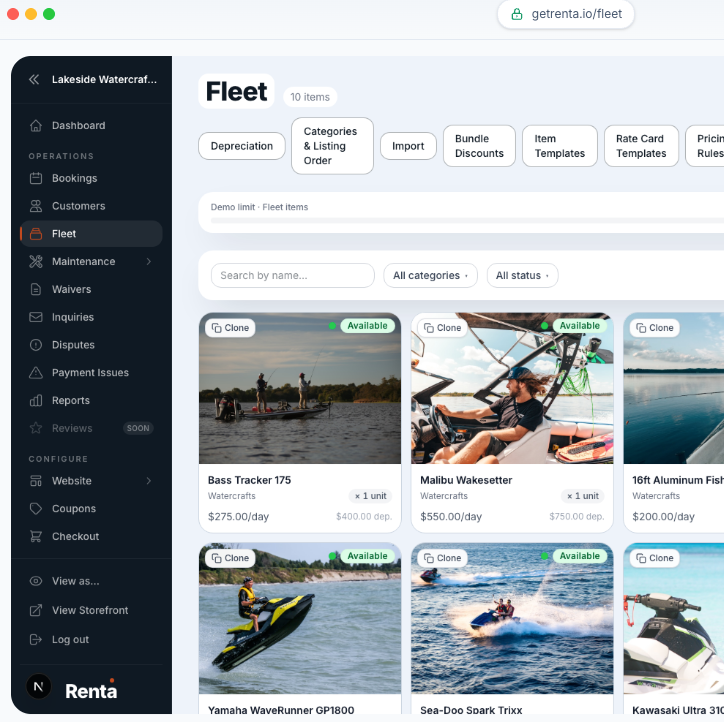
Renta's fleet is built around rentable units, so the booking calendar and the inventory read from the same records:
- Each machine as its own fleet item, with a status of available, in maintenance, or retired. Identical gear can share one item with a unit count.
- An availability engine that checks existing bookings, buffer time after returns, maintenance status, blackout dates, minimum and maximum rental lengths, and notice rules before a unit can be booked.
- Unit swaps on a booking, moving a line item to another fleet item and recalculating the price.
- Add-ons as line items, such as helmets, trailers, or a guide.
- Inspection checklists and gear assignment at pickup, and a condition check with a damage flow at return.
- Maintenance on the unit: engine hours logged at every return, service intervals by engine hours with a warning before service is due, and a full service log per machine.
- Retired units keep their records when they leave the fleet.
- Online payments and deposits through Stripe, tied to the same booking.
Renta has two plans:
Plan | Price |
|---|---|
Commission | 2.5% per booking, paid by the renter at checkout |
Flat | $300 a month, or $3,000 a year |
Standard Stripe processing, about 2.9% + 30¢, applies on both.
If your fleet lives in a spreadsheet and your bookings live in a time-slot calendar, schedule a demo or start free.
Frequently asked questions
What is rental inventory management?
It's tracking what you own, what state each unit is in and when it's next free, so bookings only go to units that can actually leave the dock.
Can I manage rental inventory in a spreadsheet?
For a handful of units, yes. A spreadsheet can't block a booking, though, so once you take online bookings someone has to keep the two in sync by hand.
How do I calculate utilization for a rental unit?
Divide the days a unit was rented by the days it was available to rent over the same period. A jet ski that was available for 100 days and rented on 62 of them has 62% utilization. Hours work the same way for hourly rentals.