Notes your staff see during checkout
Internal reminders that pop up for your team at key moments in the booking flow — customers never see these.
Where to find it
Settings → Staff reminders
Staff Notes are short reminders that appear only for your own team, at specific points during a booking — separate from anything the customer sees or signs.
Where to find it
Settings → Staff reminders.
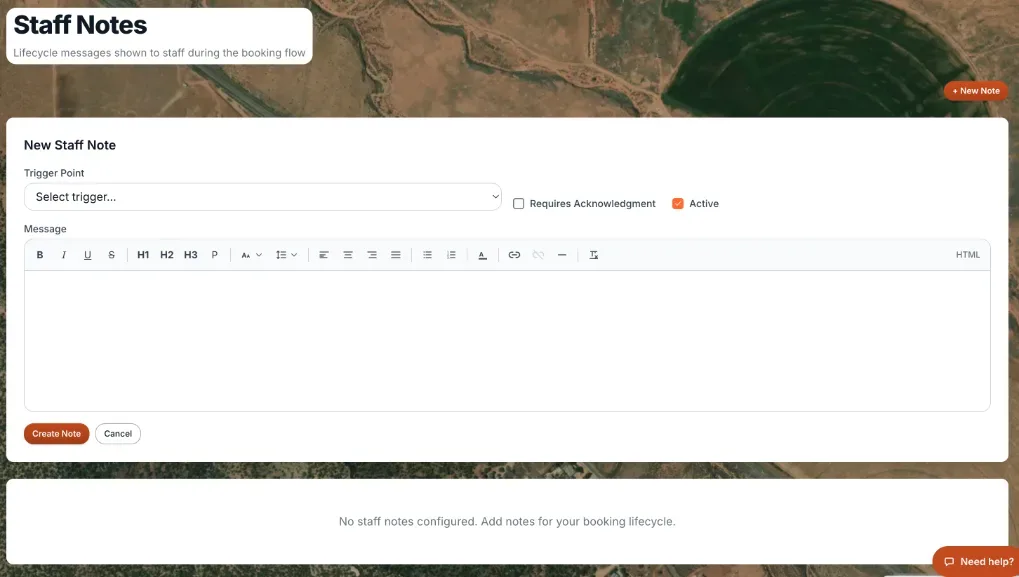 The Staff Notes settings page, showing the note list and editor
How it works
- + New Note — starts a new note. You can add as many notes as you want for the same moment in the booking flow.
- Note editor — write the Message and pick a Trigger Point: At Checkout (when staff process checkout), On Confirmation (when the booking is confirmed), Before Pickup (a reminder before pickup), At Pickup (when the customer arrives), or At Return (when the customer returns items). Untick Active to switch a note off without deleting it. Each note is saved on its own with Create Note (or Update Note when editing an existing one) — you don't have to save the whole list at once.
- Requires Acknowledgment — an optional checkbox on each note. When checked, staff have to actively confirm they've read the note before moving on, instead of it just being visible text.
- Drag to reorder — the note list can be dragged into whatever order you want your team to see them in.
Example
You add two notes with the trigger At Checkout: one plain reminder ("Confirm the customer's ID matches the booking name") and one with Requires Acknowledgment checked ("Verify the deposit amount out loud with the customer"). Staff see both, but must actively check off the second before continuing.
Good to know
- These notes are for your team only — they never appear to the customer, unlike the checkout flow builder's blocks, which customers do see and interact with.
- Because each note saves individually, you can add or edit one note without disturbing the others.
Related articles
- Building the checkout flow: common questionsQuick answers on adding checkout steps (text, questions, waiver, signature, upload, add-on, delivery), publishing, showing steps for certain products or dates, required steps, the staff pickup and return checkouts, and staff notes.
- Internal notes and photos on a customerStaff-only notes and reference photos attached to a customer, kept separate from formal documents.
- Where did it move? Old menu names and where they are nowA lookup table from the old names in the Renta menus and Settings page to where each one lives today, with a link to the help article for each.
Still stuck? Ask the chat.
Was this helpful?