Managing group tours
Set up the tour types your business offers, with duration, price, and capacity, if you run tours.
Where to find it
Tours (left sidebar, if your business type includes tours)
If your business runs group tours, this page keeps a list of your tours: name, description, duration, price and maximum capacity. It does not hold individual scheduled departures.
Where to find it
The Tours page is not in the left sidebar. Type `/tours` after your Renta web address while signed in.
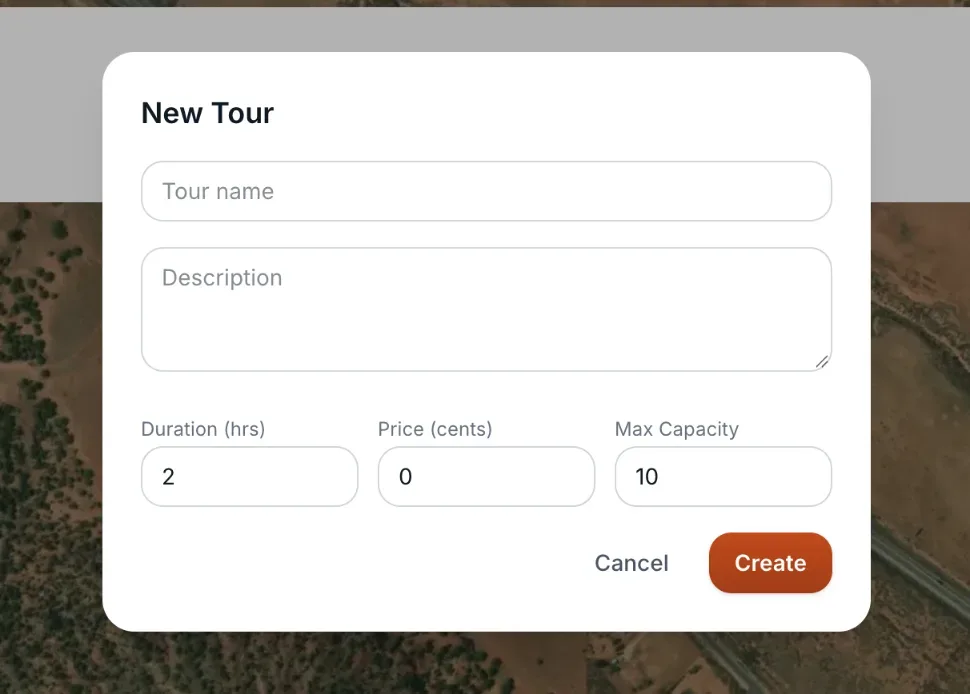 The Tours page with the New Tour form
How it works
Each tour has:
- Name — what the tour is called.
- Description — shown to customers.
- Duration (hrs) — how long the tour runs, in half-hour steps (minimum 0.5).
- Price (cents) — the price, entered in cents (7500 is $75.00). The tour card shows it in dollars.
- Max Capacity — the most people that can join at once.
Click + Add Tour to create a new one, or click an existing card to edit it and press Save. There is no delete button. Tours are shown 50 per page.
Example
If you run a two-hour guided ATV tour that fits 8 riders for $75, you can record it here with a duration of 2, a price of 7500 and a capacity of 8.
Good to know
- Nothing on this page creates a booking or shows who has registered. Bookings you take go through Bookings. See also Tours and cabins: common questions.
Related articles
Still stuck? Ask the chat.
Was this helpful?