Upcoming and pending charge attempts
See charges and deposit holds that are queued to run later, and any that stopped and need a person to check.
Where to find it
Bookings → Scheduled payments
Some money is not collected right away: a rental charge set for a later date, or a deposit hold scheduled for later. This page lists every one of those that is waiting to run, plus any that stopped on its own and needs a person.
Where to find it
Bookings → the Scheduled button at the top. The page is called Scheduled payments.
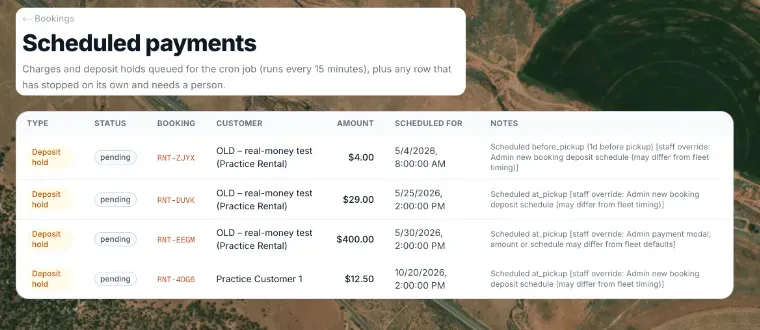 The Scheduled Payments list with status badges
How it works
The page says "Charges and deposit holds queued for the cron job (runs every 15 minutes), plus any row that has stopped on its own and needs a person." Each row shows:
- Type — Rental charge or Deposit hold.
- Status — pending (gray: waiting, nothing has happened yet), charging (blue: an attempt is running now) or needs review (amber).
- Booking — the confirmation number, a link to the booking.
- Customer, Amount, Scheduled for, and Notes (the reason, for a row that needs review).
If nothing is waiting it says "No scheduled charges or holds waiting."
Example
A row marked needs review means Renta cannot tell from its own records whether the customer's card was charged. Open the booking and check the payment in Stripe before charging again.
Good to know
- This page is about charges that have not happened yet. Past transactions are in payment history on the booking itself.
- A booking's own scheduled rental charge also shows on that booking's Payments & Documents tab.
Related articles
- Managing bookings: common questionsQuick answers on finding a booking, creating one, blocking dates, the Start/Finish/Cancel buttons, refunds, discounts, rescheduling, statuses, and what customers can change themselves.
- Payment plans, installments and pay later: what Renta supportsRenta has no automatic installment plan and no pay-later button for customers, but you can take a down payment, stage the balance with scheduled charges, or send a payment link whenever the customer is ready.
- Finding a bookingOn a computer, search above the availability calendar to jump to a booking; on a phone, search and filter a list by status.
- Common questions: refundsQuick answers on sending money back to a customer, why a refund has not gone out yet, how much you can refund, what happens to Renta's fee, gift cards and cash, and the difference between refunding and releasing a deposit.
- Booking statuses explainedWhat the status badges mean (Pending, Confirmed, Active, Returned, Cancelled, Expired), and what the calendar colours mean.
Still stuck? Ask the chat.
Was this helpful?