Sending a price quote before booking
Send a customer a price they can accept and pay online. The quote holds the gear while they decide, and open quotes show brown.
Where to find it
Quotes (left sidebar)
A quote is a booking you send the customer to accept and pay for themselves. You choose how long to hold the gear while they decide. Once the hold ends, someone else can book it.
Where to find it
Click Quotes in the left sidebar.
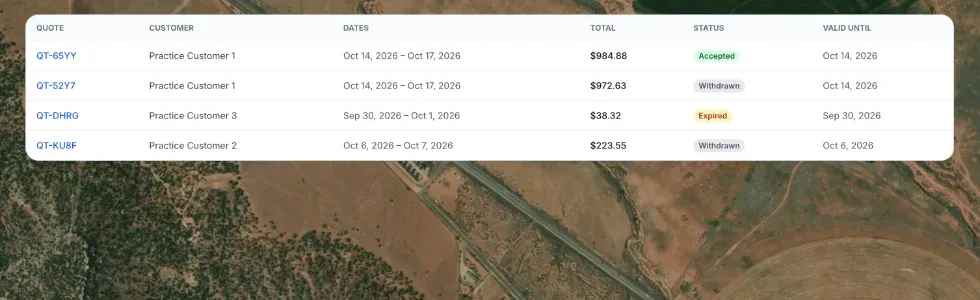 The Quotes list with status tabs
How it works
- Status tabs — All, Drafts, Awaiting reply, Accepted, Declined, Expired.
- Each row shows the quote number, customer, rental dates, total, and a coloured status badge: green accepted, blue awaiting reply, red declined, amber expired, gray cancelled or draft.
- New quote (top right) opens the New Booking screen, where you build the order and click Generate quote.
- Brown means open quote. While a quote is open and the customer has not paid, it shows brown on your calendars, with a Quote entry in the calendar key. On the Bookings list and the booking page it carries a brown Quote chip that links to the quote. Once the customer pays, it turns into a normal booking colour.
What the customer sees
The quote page lists each item at its full price, then each automatic discount on its own line (for example Duration discount or Bundle discount), any coupon, tax, and your own custom lines such as delivery. If a Renta booking fee applies, it appears as its own row and the bottom line reads Total due, so the number on the quote is what they are charged at payment.
Example
A customer emails asking what two jet skis would cost for a weekend. Send a quote instead of a full booking, since they have not committed. The gear is held for the time you chose, and the quote shows brown until they accept and pay.
Good to know
- Custom lines you add to a quote (delivery, setup, a manual discount) are taxed, so the quote total matches the booking exactly.
- A quote becomes a confirmed booking once the customer accepts and pays. See Building and sending a quote.
Related articles
- Quotes: common questionsQuick answers on sending a quote, the hold time, why Generate quote or Send is greyed out, quote statuses, and what happens when a customer accepts or declines.
- Booking statuses explainedWhat the status badges mean (Pending, Confirmed, Active, Returned, Cancelled, Expired), and what the calendar colours mean.
- Common questions: how a price is calculatedQuick answers on how a booking total is built, why it differs from the price on the item, and how tax, rounding, the Renta booking fee, hand-typed prices and extra charges work.
- Common questions: Renta's fee, card fees, taxes and extra chargesShort answers on what Renta charges you, what your customer pays on top of your price, sales tax, the security deposit, damage and late fees, cancellation fees, and switching plans.
Still stuck? Ask the chat.
Was this helpful?