Requiring extra bank verification for payments
Turn on 3D Secure bank verification automatically, always, or only above a dollar threshold, to reduce fraud and disputed charges.
Where to find it
Settings → Checkout steps → Client view tab → Payment Security card
3D Secure is an extra verification step (like a one-time code or bank app confirmation) that a customer's own bank can ask for before a card payment goes through. It shifts liability for certain disputes away from your business and toward the bank, and this setting controls when Renta asks for it.
Where to find it
Checkout (left sidebar) → Client view tab → the Payment security card.
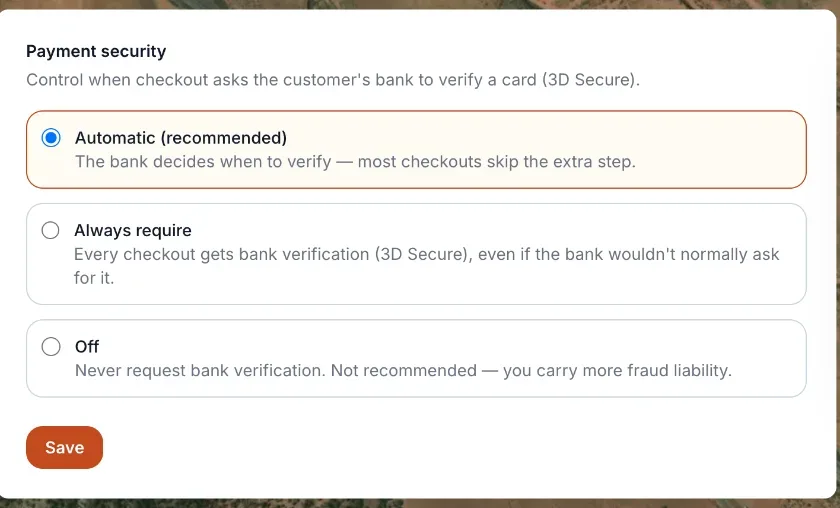 The Payment Security card
How it works
- Payment security card — one of three options:
- Automatic (recommended) — Renta and Stripe decide when verification is needed, based on the bank's own risk signals. This is the default.
- Always require — every payment (or every payment above a threshold you set) must pass verification.
- Off — verification is never required.
- Only require above — a dollar amount that only appears when Always require is selected. Verification is forced for payments at or above this amount, and smaller payments fall back to Automatic. Set it to 0 to require verification on every payment.
Example
You choose "Always require" with a $500 threshold. A $300 booking is left to Automatic, so your customer's bank decides whether to ask. A $600 booking prompts the customer's bank to confirm the charge before it completes.
Good to know
- "Automatic" is the recommended setting for most businesses — it lets your payment processor apply verification only where it actually reduces fraud risk, without adding friction to every checkout.
- Turning this Off removes a layer of fraud protection; only do it if you understand the tradeoff.
- This is separate from Requiring a photo ID before high-value bookings, which checks who the customer is rather than verifying the card payment itself.
Related articles
- Payment security and ID verification: common questionsQuick answers on 3D Secure (extra bank verification), the Payment security card, the ID verification (Stripe Identity) card, the threshold, what customers see when asked to verify, and the Payment unavailable message.
- Returning customers confirm their email with a 6-digit codeWhen someone books with an email that already belongs to one of your customers, they must type a 6-digit code emailed to that address before they can continue. Here is what they see and what to do when the code does not arrive.
Still stuck? Ask the chat.
Was this helpful?