Requiring a photo ID before high-value bookings
Ask customers to verify their identity with a photo ID before paying, on bookings at or above a dollar amount you choose.
Where to find it
Settings → Checkout steps → Client view tab → Identity Verification card
Identity verification asks a customer to confirm who they are with a photo ID (using Stripe's ID-check service) before they can pay for an expensive booking — useful protection against stolen cards or fake identities on your highest-value rentals.
Where to find it
Checkout (left sidebar) → Client view tab → the ID verification (Stripe Identity) card.
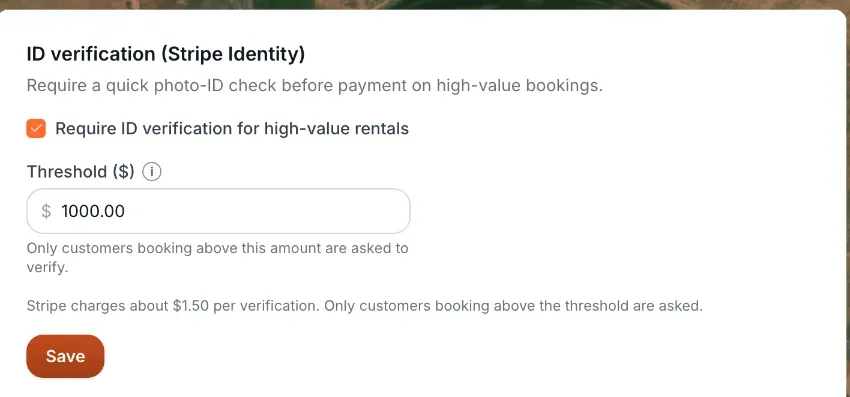 The Identity Verification card
How it works
- Require ID verification for high-value rentals — an on/off tick box. Off by default.
- Threshold ($) — a dollar amount, $1,000 to start. The box is greyed out while the tick box is off. A payment at or above this amount asks the customer to verify their ID; anything below it skips the check. A customer who has already been verified is not asked again.
Example
You enable ID verification with a $1,000 threshold. A $400 rental checks out normally. An $1,800 rental first asks the customer to photograph their ID and take a selfie before they can pay.
Good to know
- Each verification costs your business roughly $1.50, charged by Stripe — only customers booking at or above your threshold are asked, so you aren't paying this on every booking.
- This checks who the customer is; it doesn't verify the payment method itself. For that, see Requiring extra bank verification for payments.
Related articles
- Payment security and ID verification: common questionsQuick answers on 3D Secure (extra bank verification), the Payment security card, the ID verification (Stripe Identity) card, the threshold, what customers see when asked to verify, and the Payment unavailable message.
- Returning customers confirm their email with a 6-digit codeWhen someone books with an email that already belongs to one of your customers, they must type a 6-digit code emailed to that address before they can continue. Here is what they see and what to do when the code does not arrive.
- Storing a customer's ID and documentsUpload a customer's license, ID, passport, insurance, or waiver, and see which ones Stripe has verified.
Still stuck? Ask the chat.
Was this helpful?