Damage reports and checkout photos on a unit
Before/after photos and any damage reported for one specific physical unit.
Where to find it
Fleet → open an item → Details → a unit
For each unit of an item, Renta keeps a photo record from each rental pickup and any damage reported against it, so you have proof of a unit's condition over time.
Where to find it
Fleet → open an item → Details → a unit → scroll to the photo and damage sections.
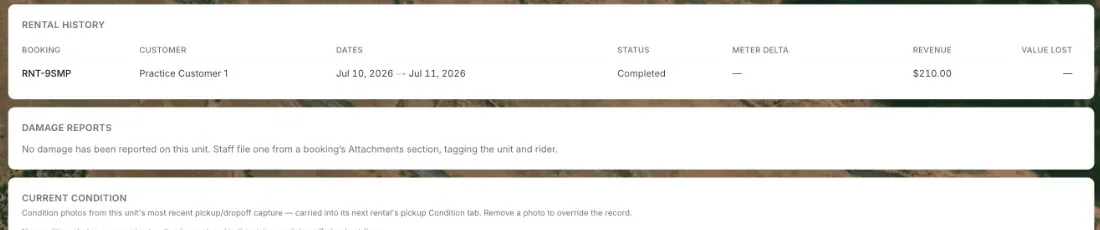 Condition Baseline and Damage Report Table on a unit
How it works
- Condition Baseline — the most recent set of reference photos showing the unit's pristine condition, used to compare against later pickups.
- Pre-Rental Photos — inspection photos taken at every rental pickup, organized by booking date, showing the unit's condition each time it went out.
- Damage Report Table — any damage incidents reported for this unit, with the related booking, date reported, description, and status.
Example
If a jet ski comes back scratched, staff can log a damage report tied to that booking. The next customer's pre-rental photos, compared against the Condition Baseline, would then show that scratch was already there before their rental.
Good to know
- These photos and reports live on a unit's page, so they only exist for items that have unit pages. Unit pages exist once an item has units listed on its Identity step. That happens when variants are set to Assign per unit (the default for new items) or Enable maintenance tracking is switched on. An item set to Bulk with neither usually has no unit pages. The old Tracking Mode choice (Individual or Bulk) is no longer in the item editor. See Item variants: color, size, and other options.
- A staff pre-rental checklist (separate from photos) is set up per item under Requiring an inspection before a rental goes out. The matching checklist for when a machine comes back is in Post-ride (return) inspection checklist.
Related articles
- Common questions: individual units (machines, vehicles)Quick answers about adding, naming, moving, retiring and selling one physical machine, plus its QR sticker, scanning, meter readings, booking history, damage reports and photos.
- Maintenance templatesBuild a reusable set of service tasks and inspection items once, then apply it to many machines, and understand exactly what applying does and does not change.
- Marking a unit as soldRecord the sale of one physical unit so it stops being bookable, leaves your asset totals, and shows its gain or loss against book value.
- Scanning a unit's QR codeFind one specific unit fast by scanning its sticker with a camera, or by typing its asset tag or serial number, and what each result means.
- Logging service and adjusting tasksHow to record a finished service, add a recurring or one-time service, change or delete a task, log one service on many machines, defer a task, correct meters and fix mistakes in the history.
Still stuck? Ask the chat.
Was this helpful?