Your subscription plan and billing history
See which plan you are on, what it costs, when it renews, switch plans, and open your past invoices.
Where to find it
Settings → Your Renta plan (Billing & Subscription page, /settings/billing); Pricing → Fees & policies → Change plan in Billing
The Billing & Subscription page shows your current plan, what it costs, when it renews, the other plan you could switch to, and your invoices.
Where to find it
On the Settings page it is the Your Renta plan card in the Business group (the page itself is titled Billing & Subscription, at /settings/billing). You can also go to Pricing → Fees & policies and press Change plan in Billing on the Renta fee card. Viewing it needs the "View billing" permission (Owners and Managers). Changing the plan needs "Manage billing" (Owner only).
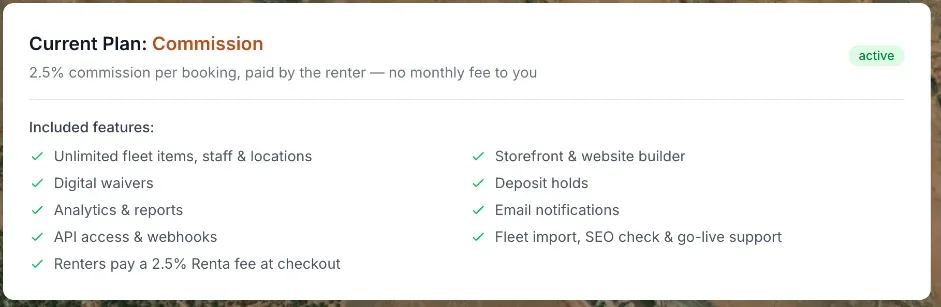 The Current Plan card on the Commission plan: 2.5% paid by the renter, no monthly fee, and no renewal date
How it works
Renta has two plans with the same features. They differ only in how you pay:
- Commission — $0 a month. The renter pays Renta's 2.5% platform fee at checkout.
- Flat — $300 a month, or $3,000 a year (paying yearly saves 17%). Renta takes 0% of your bookings.
The page has three parts:
- Current Plan — "Current Plan: [Commission or Flat]", a line saying what you pay (on Commission: "2.5% commission per booking, paid by the renter — no monthly fee to you"), then, on Flat only, "Renews [date] · billed monthly" (or annually), or "Your Flat plan is set to end on [date]" if you scheduled a switch. On the Commission plan nothing is billed, so there is no renewal line. A status badge shows active, past_due, or another status. The Included features list is the same on both plans.
- Available Plans — a card for each plan with a button: Switch to flat billing (pick $300/mo or $3,000/yr first; you pay on a Stripe checkout page), Switch to commission (confirm "Switch to the Commission plan?"; you keep Flat until the period you paid for ends), or Keep Flat instead to undo a scheduled switch.
- Billing History — a table with Date, Amount, Status, and Invoice (a View → link that opens it in a new tab). It shows your most recent 10 invoices and only appears once you have at least one.
Example
On the Commission plan you pay Renta nothing monthly, and the renter covers the 2.5% fee at checkout. On the Flat plan you pay $300 every month instead, and no Renta fee is added for your renters.
Good to know
- Renta blocks a switch to Commission while an invoice is unpaid, and shows a "Something went wrong" box.
- If Renta agreed a special monthly price with you, the Flat card shows it and the yearly option is hidden.
- The 2.5% platform fee is separate from your plan choice, see Renta's fee vs. your subscription plan.
- For more quick answers see Common questions: your plan, billing, and invoices.
Related articles
- Common questions: Renta's fee, card fees, taxes and extra chargesShort answers on what Renta charges you, what your customer pays on top of your price, sales tax, the security deposit, damage and late fees, cancellation fees, and switching plans.
- AI credits for your website assistantSee your free monthly AI credits and bought credits, and buy a $25, $50 or $100 credit pack.
- Common questions: how a price is calculatedQuick answers on how a booking total is built, why it differs from the price on the item, and how tax, rounding, the Renta booking fee, hand-typed prices and extra charges work.
- Who pays the Renta feeChoose whether renters pay Renta's per-booking fee on top of your price, or your business absorbs it and it comes out of your payout.
- Dashboard — common questionsQuick answers on every dashboard card, number and button, how to rearrange or hide widgets, what the calendar colors mean, and why a card is missing or looks empty.
Still stuck? Ask the chat.
Was this helpful?