AI credits for your website assistant
See your free monthly AI credits and bought credits, and buy a $25, $50 or $100 credit pack.
Where to find it
Settings → Your Renta plan (Billing & Subscription page, /settings/billing) → AI credits card
AI credits pay for your website AI assistant. Every shop gets free credits each month, and you can buy more if you need them.
Where to find it
On the Settings page open the Your Renta plan card in the Business group (the page is titled Billing & Subscription, at /settings/billing). The AI credits card sits below Available Plans. Seeing it needs the "View billing" permission (Owners and Managers). Buying credits needs "Manage billing", which only the Owner has.
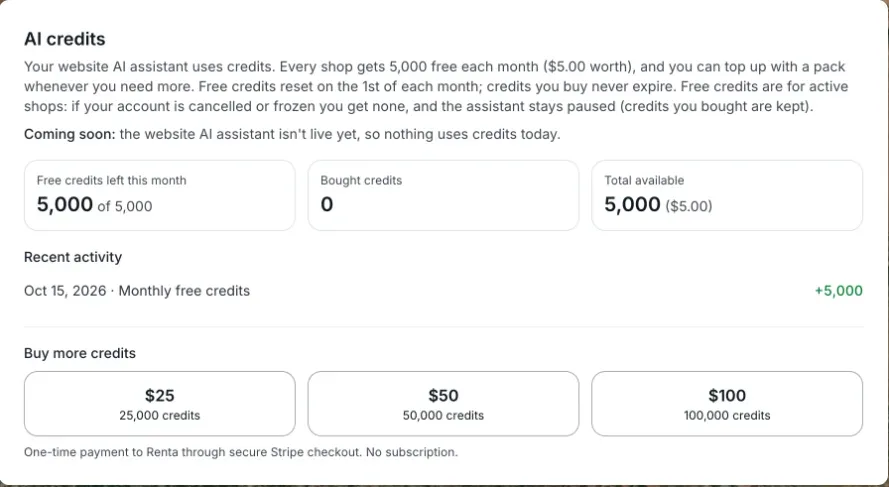 The AI credits card with free credits, bought credits and the three packs
How it works
- Free credits — every active shop gets 5,000 credits ($5 worth) free each month. They reset on the 1st of the month, and unused free credits do not carry over. A shop whose account is cancelled or frozen gets no free credits, and its website assistant is paused until the account is active again; credits it bought are kept.
- Bought credits — packs are one-time payments to Renta: $25 (25,000 credits), $50 (50,000 credits) or $100 (100,000 credits). Bought credits never expire.
- Spending order — the assistant uses your free credits first, then bought credits.
The card shows Free credits left this month, Bought credits, Total available, and a Recent activity list of your last 10 credit changes (monthly free credits, credits bought, and assistant usage).
Buying a pack
1. Press $25, $50 or $100 under Buy more credits. 2. You go to a secure Stripe checkout page. Pay there. 3. You come back to the billing page. The credits are added within a minute; refresh if you don't see them yet.
If you close checkout without paying, nothing is charged.
Example
You buy the $25 pack in March and the assistant uses 7,000 credits that month. The first 5,000 come from your free credits and the other 2,000 from your pack, leaving 23,000 bought credits. On April 1st you get a fresh 5,000 free credits on top of those 23,000.
Good to know
- The website AI assistant is coming soon. Until it is live, nothing uses credits.
- Credit packs are paid to Renta, not through your own Stripe payments account, and they do not change your Renta plan.
- Renta support viewing your account cannot buy credits for you.
- For your plan and invoices see Your subscription plan and billing history.
Related articles
- Common questions: your plan, billing, and invoicesQuick answers about Renta's two plans, how to switch between them, what the status badge means, where invoices are, and who is allowed to view or change billing.
- Common questions: QuickBooks, Google, smart locks, AI assistants, API keys, and webhooksQuick answers about connecting QuickBooks Online, Google, Instagram, RideDog, igloohome smart locks, Claude or ChatGPT (MCP), API keys, and webhooks, plus why a connection may be missing or greyed out.
- Turning the Renta Help Chat widget on or offWhat the "Need help?" chat bubble in your admin answers and how to reach a person from it, and how to switch it off for good.
- Staff alerts: the notification bell and what each alert meansThe bell at the top of the admin, the pop-up and email that come with each alert, and what every alert (new booking, inquiry, overdue return, driver runs, kiosk alerts and more) means.
- Website leads in one inboxContact-form messages and website-assistant handoffs, together in one inbox.
Still stuck? Ask the chat.
Was this helpful?