Fine-tuning what Managers and Staff can do
Override specific capabilities for the Manager and Staff roles beyond their default permissions.
Where to find it
Settings → Team → Permissions tab → Override permissions card
The Override permissions card lets you decide whether your Managers and Staff get four extra abilities that Owners always have. Each switch covers Managers and Staff together, and Owners always keep full access.
Where to find it
Settings → Team, then the Permissions tab (next to Team Members). The Override permissions card is there.
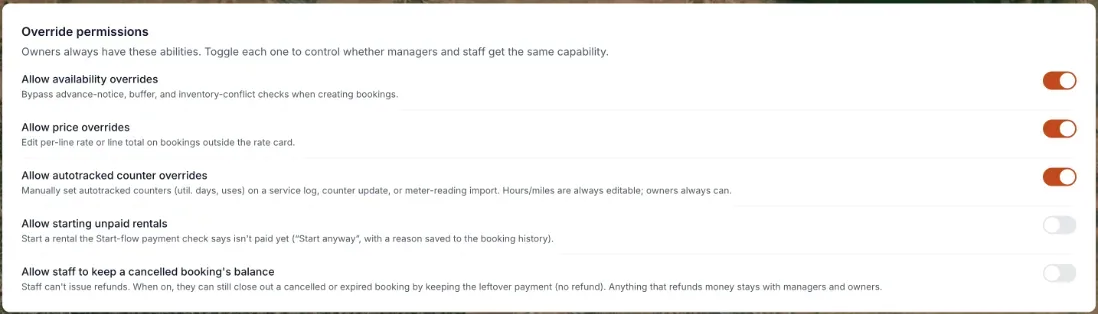 The Override permissions card with per-capability toggles
How it works
There are four switches:
- Allow availability overrides — lets a Manager or Staff member bypass advance-notice, buffer-time, and inventory-conflict checks when creating a booking.
- Allow price overrides — lets a Manager or Staff member edit a per-line rate or line total on a booking outside your normal rate card.
- Allow autotracked counter overrides — lets a Manager or Staff member manually set autotracked counters, like utilization days or uses, on a service log, counter update, or meter-reading import. Hours and miles fields are always editable regardless of this toggle, and Owners can always override everything.
- Allow starting unpaid rentals — lets a Manager or Staff member start a rental that the payment check at pickup says isn't paid yet, using Start anyway. The reason they give is saved to the booking's history.
The counter override starts switched on; the other three start off until an Owner turns them on. Changing a switch does not save it right away. Press Save changes (or Discard to back out). Only an Owner can change these switches; everyone else sees the card but cannot edit it.
Example
If you want your Manager to be able to adjust a booking's price when a customer negotiates in person, turn on Allow price overrides and press Save changes. Because the switch covers both roles, your Staff members get it too.
Good to know
- Each switch applies to every Manager and Staff member. You cannot give one person an override and withhold it from another without changing their role.
- Owner permissions cannot be reduced; if you want someone restricted, invite them as Manager or Staff instead — see Inviting staff.
A fifth switch: keeping a cancelled booking's balance
The card also has Allow staff to keep a cancelled booking's balance. Staff cannot issue refunds, so by default they cannot close out a cancelled or expired booking at all. With this switch on, they can close it out by keeping the leftover payment (no refund). Anything that would refund money stays with Managers and Owners. It starts switched off, only an Owner can change it, and it applies to Staff. The introduction at the top lists four switches; this fifth one was added later.
Why these switches are Owner-only, even through an AI assistant
An AI assistant connected through a key cannot change these switches. If an assistant tries to save one of the override settings, it is refused with a message such as `"staff_can_override_availability" is owner-only. Change it in Settings › Team.` See Connecting an AI assistant.
Related articles
Still stuck? Ask the chat.
Was this helpful?