Date picker and Book Now button widgets
Let visitors pick rental dates right on the page, or add a standalone button that jumps straight to checkout.
Where to find it
Website (left sidebar) → open a page → Sections tab → Add Section → "Date Picker" or "Book Now Button"
The Date Picker widget lets visitors choose rental dates directly on your page. The Book Now Button widget is a standalone button that opens your booking flow.
Where to find it
Website → open a page → drag Date Picker or Book Now Button from the widget picker.
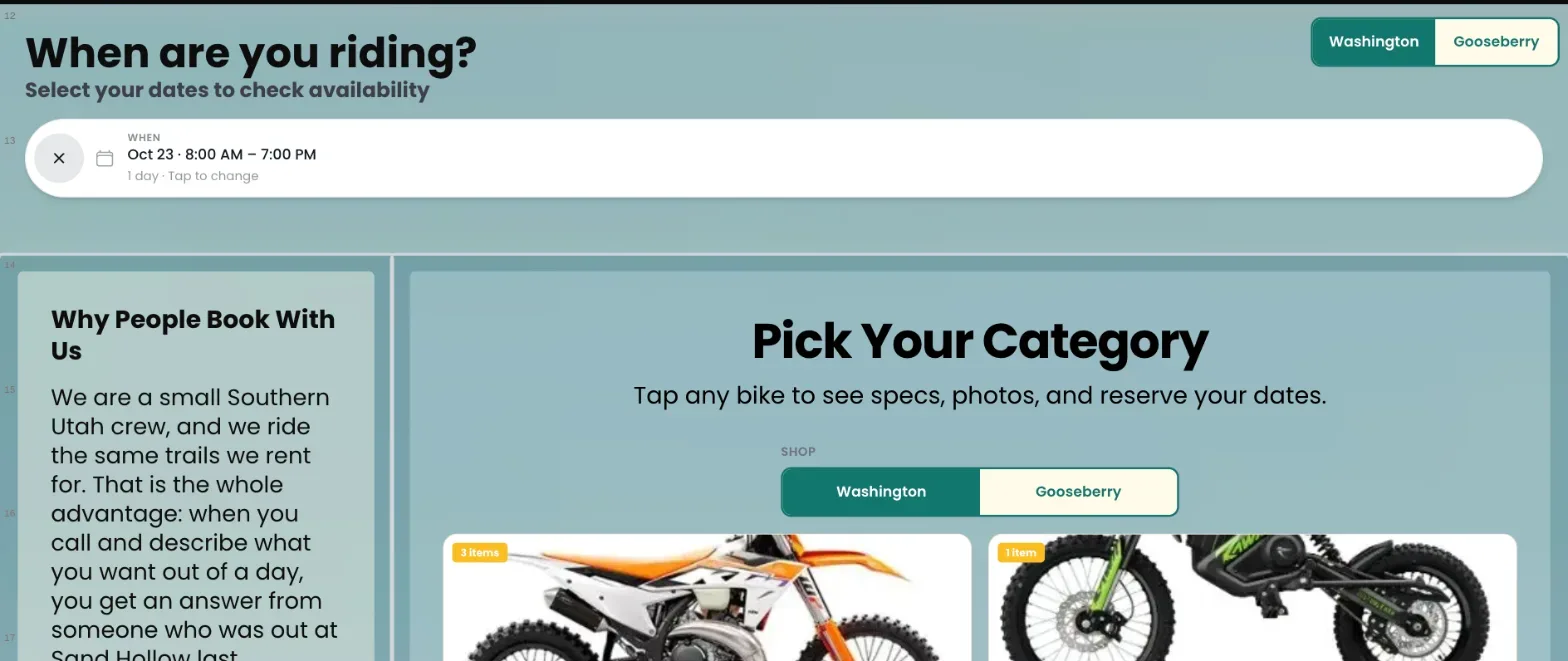 The Date Picker widget in bar layout above a Fleet Grid
How it works
Date Picker
- Heading and Subheading: title and supporting line.
- Layout: Bar (a thin horizontal bar with faux date fields, the default), Calendar (a clickable month grid), or Stacked (a tall card with real date fields).
- Size: small, medium, or large controls.
- Show time inputs: adds an hour picker for pickup and return alongside the dates.
- When placed on the same page as a Fleet Grid widget, picking dates here filters that grid to show only what's available.
Book Now Button
- Label: the button text, default "Book Now."
- Size: small, medium, or large.
- Alignment: left, center, or right within its space.
- Style: primary (filled), secondary, or outline.
- Clicking it always sends the visitor to your checkout flow.
Example
An e-bike rental business might put a Date Picker in "Bar" layout at the top of the homepage, linked to a Fleet Grid below it — so as soon as a visitor picks their dates, the grid updates to show only bikes available then.
If you have more than one shop
With two or more shops, the Date Picker shows a Shop picker so the customer chooses where they'll pick up before checking dates. In the widget's Shop settings you can pin it to one shop or leave it on Follow customer's choice. See Running more than one shop.
Good to know
- The Date Picker only filters a Fleet Grid when the two are placed on the same page and linked.
- Use the Book Now Button when you just want a simple shortcut to checkout without a date-picking step first.
Related articles
- Website widgets — common questionsQuick answers on adding and setting up each website block (hero banner, fleet grid, photo gallery, Book Now button, contact map, reviews, FAQ, navbar, footer and more), and why a block may look empty on your live site.
- Navigation bar and footer widgetsThe site-wide header with your logo and menu links, and the footer with contact info and social links.
- Website AI assistantTurn on Renta's own chat assistant for your public website. It answers customer questions from your live rentals, prices and availability, and is paid for with AI credits.
- The hero banner widgetA large banner at the top of a page with a headline, image or video background, and a call-to-action button.
- Reviews and FAQ widgetsShow your customer reviews in a list, grid or carousel, and answer common questions in a collapsible FAQ list.
Still stuck? Ask the chat.
Was this helpful?