Website leads in one inbox
Contact-form messages and website-assistant handoffs, together in one inbox.
Where to find it
Messages → Inbox (the page is headed Communications; Inquiries tab)
The Inquiries tab of the Communications page collects the leads that come in from your website: messages sent through your contact form, and chats where a customer asked your Website AI assistant to talk to a person.
Where to find it
Messages → Inbox in the left sidebar. The page is headed Communications, and the Inquiries tab is the one that opens.
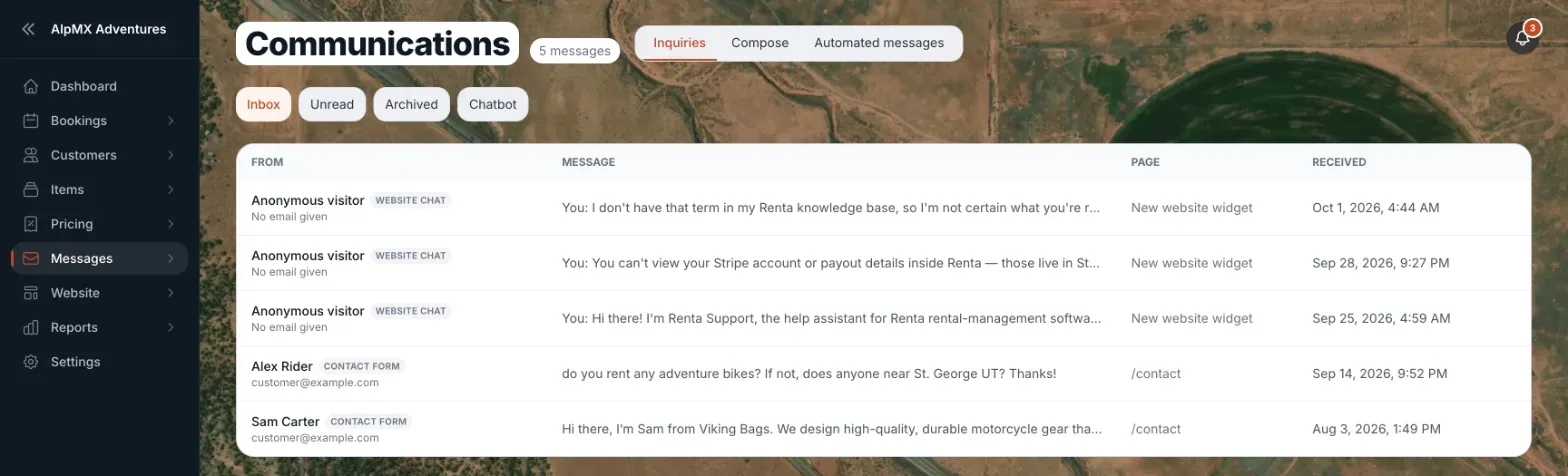 The Communications inbox showing the Inbox, Unread and Archived tabs
How it works
- Inbox — the default tab, showing both unread and already-read leads.
- Unread — leads you haven't opened yet.
- Archived — leads you've filed away.
- There is no search box on this page. Use the tabs to narrow the list.
- Each row shows who it is from, the message, the page it was sent from, and when it arrived.
- A website-assistant handoff shows the page as "Website chat". The message holds the customer's question followed by the recent chat, so you can see what the assistant already told them.
- Reply by email, Mark unread and Archive (or Move back to inbox) — actions when you open a row. Reply in Inbox also shows when your Inbox is turned on.
Example
A visitor fills out your "Contact us" form asking about weekend availability. It appears as an unread lead in the Inbox tab with an orange dot next to it until someone opens it.
Good to know
With nothing in it, the Inbox tab reads "No messages yet. Anything sent through your website's contact form or website assistant shows up here."
Related articles
- Inquiries and emails: common questionsQuick answers on the Communications page, contact-form leads, website-assistant handoffs, replying, Compose, email templates and their triggers, and why Send or a tab is missing or greyed out.
- Automated emails Renta sends for youEdit the confirmation, reminder, and other emails Renta sends automatically when a booking event happens.
- Sending a one-off email to a customerPick a customer, start from a template or a blank message, and send an email from the Communications inbox.
- Where did it move? Old menu names and where they are nowA lookup table from the old names in the Renta menus and Settings page to where each one lives today, with a link to the help article for each.
- Website widgets — common questionsQuick answers on adding and setting up each website block (hero banner, fleet grid, photo gallery, Book Now button, contact map, reviews, FAQ, navbar, footer and more), and why a block may look empty on your live site.
Still stuck? Ask the chat.
Was this helpful?