How and when you collect a security deposit
Choose when a deposit hold is placed on the customer's card and how long after return it's released.
Where to find it
Pricing → Fees & policies → Deposit / percentage down card
A security deposit is a hold placed on a customer's card that you can draw from if a rental comes back damaged or late, and refund if it doesn't. This page controls when that hold is placed, how long it stays live, and what happens when it's about to expire — not the dollar amount itself.
Where to find it
In the sidebar, hover Pricing and click Fees & policies, then find the Deposit / percentage down card. (This page is the Universal Rules tab of the pricing page, so you may see that name at the top.) Only an owner or a manager with settings access sees it. The deposit amount is set separately, per fleet item, on that item's own editor (Fleet, open the item, Pricing step, Security Deposit section, Hold Amount) — this card only controls how the hold behaves once it's placed.
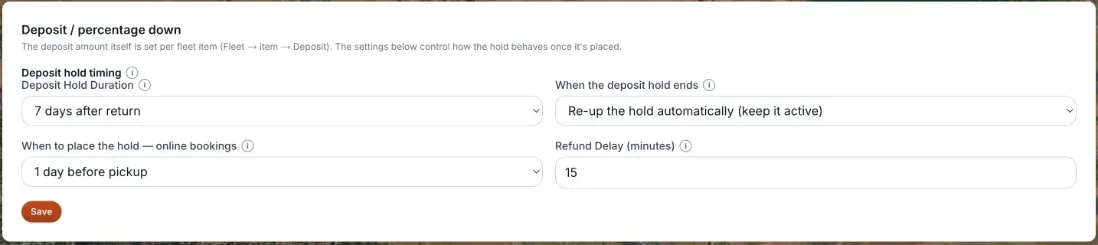 The Deposit / Percentage Down card
How it works
- When to place the hold — online bookings — for customer self-serve bookings on your storefront, choose When the booking is made, 1 day before pickup, or 3 days before pickup. (For bookings you create yourself in the admin, you instead choose the hold timing per booking, in the payment step.) The hold is placed that long before pickup, or right away if that moment has already passed. When the booking is made and 1 day before pickup both mean 24 hours before pickup, never earlier.
- Deposit Hold Duration — how long after the rental's return the hold stays in place before auto-releasing: Release at rental return, or 24, 48, 72 hours, or 7 days after.
- When the deposit hold ends — what happens as the hold nears its expiration at your card processor (holds generally expire after about 7 days): Re-up the hold automatically (keep it active), Let it release at the hold window above, or Don't hold a security deposit. That last choice means Renta never places or queues a deposit hold on its own, whatever amounts your items have. You can still place a one-off hold by hand from a booking's payment window.
- Refund Delay (minutes) — a grace window before a scheduled refund is sent to Stripe. Staff can cancel it or run it right away during that window. It starts at 15 minutes. Enter a whole number from 0 to 10,080 (one week). Set it to 0 to send it on the next refund run, and a blank box counts as 0.
The 3-days-before choice used to behave like 1 day before; it now places the hold 3 days out. One catch: if you chose Let it release at the hold window above (not Re-up), the hold can be placed a little later than you asked, so the card authorization (about 7 days) is still alive when it releases. With Re-up, Renta renews the hold as it goes.
Saving
Nothing on this card saves by itself. Change what you need, then click the single Save button at the bottom, which saves all four settings together. A check mark and "Saved" show for a couple of seconds. If it fails you will see "Could not save settings. Try again."
Example
Pickup is Friday, return is Sunday, with the defaults (hold placed when the booking is made, which means 24 hours before pickup) and a 48-hour hold duration. The hold goes on the card Thursday, and — if the rental comes back clean — auto-releases Tuesday, 48 hours after the Sunday return.
Good to know
- Every fleet item sets its own deposit amount; the settings on this page apply the same hold timing and expiry behavior to every rental, regardless of which item's deposit is being held.
- Placing the hold closer to pickup (rather than at checkout) shortens how long the customer's funds are tied up, which can reduce complaints about held money.
- The deposit is separate from the price calculation described in How a price is calculated — it's held and released, not charged and spent.
Related articles
- Common questions: deposits, late fees and cancellation policyQuick answers on security deposits, refund delay, rental day counting, the cancellation refund tiers, late return fees, early pickup and fee display, including what customers ask about deposits and partial refunds.
- Charging a late return feeSet a flat or per-hour fee for rentals that come back late, with a grace period, and see how it is added when you finish the return.
- Night-before pickup templatesCreate a night-before template (pickup window and fee), give it to the items that offer it, and see how it changes a booking.
- Your cancellation and refund policyA tiered refund schedule that pays customers back different amounts depending on how close to pickup they cancel.
- How your billable rental days are countedChoose whether pickup and return both count as full days, or only the nights between them — this changes the price of every multi-day booking.
Still stuck? Ask the chat.
Was this helpful?