Your cancellation and refund policy
A tiered refund schedule that pays customers back different amounts depending on how close to pickup they cancel.
Where to find it
Pricing → Fees & policies → cancellation policy card
Your cancellation policy is a set of rules that decide how much of a booking a customer gets back if they cancel, based on how many hours before pickup they cancel.
Where to find it
In the sidebar, hover Pricing and click Fees & policies; the cancellation policy is the card after Deposit and Rental day counting, with a Tiers list and a What your guests will read preview. (This page is the Universal Rules tab of the pricing page, so you may see that name at the top.) (Older links to a separate "Cancellation" settings page now redirect here.) You need settings access to see it.
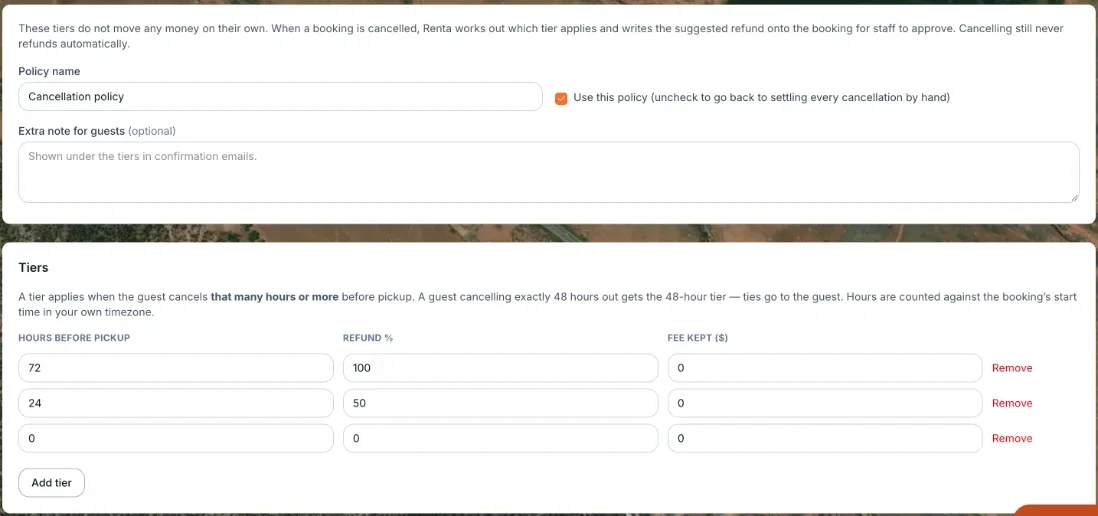 The Cancellation Policy card, showing refund tiers
How it works
At the top of the card:
- Policy name — required, up to 120 characters. It starts as "Cancellation policy".
- Use this policy (uncheck to go back to settling every cancellation by hand) — ticked by default. Untick it to stop using the schedule.
- Extra note for guests (optional) — up to 2,000 characters, shown under the tiers in confirmation emails.
Each tier in the table has:
- Hours before pickup — the cutoff for this tier, a whole number from 0 to 8,760. A tier applies when the guest cancels that many hours or more before pickup; hours are counted against the booking's start time in your own timezone, and a cancellation exactly on the line (say, exactly 48 hours out) counts in the guest's favor.
- Refund % — how much the customer gets back if they cancel within that window (0–100%).
- Fee kept ($) — an optional flat dollar amount taken off the refund. The refund is the percentage amount minus this fee, and never less than zero. The guest-facing wording then adds ", less a $X cancellation fee".
Click Add tier for a new row (up to 12 tiers) and Remove to delete one (you must keep at least one). You edit rows right in the table. Click Save policy to save, and "Saved." appears. Nothing saves until then, and Save policy is disabled while anything is invalid.
If you have never saved a policy, the table starts with three suggestions that are not saved yet: 72 hours at 100%, 24 hours at 50%, and 0 hours at 0%.
What your guests will read shows the wording guests will get, for example "Cancel 72 or more hours before pickup: full refund." It stays blank, with "Fix the problems below to see the wording your guests will get.", until the policy is valid. Problems show in red: a missing name, no tiers, an hours value that is not a whole number from 0 to 8,760, two tiers starting at the same hour, or a refund outside 0–100%. An amber warning says "Cancellations made less than N hours before pickup match no tier. Those are handed to staff to settle by hand. Add a 0-hour tier to cover them."
A typical schedule might look like:
- Cancel 168+ hours (7+ days) before pickup → 100% refund
- Cancel 72–167 hours (3–6 days) before pickup → 50% refund
- Cancel less than 72 hours before pickup → 0% refund
Example
Using the schedule above, a customer with a $400 booking who cancels 96 hours (4 days) before pickup falls in the 72-hour tier and gets back 50% — $200 — minus any flat fee kept.
Good to know
- Cancelling never refunds money automatically. The schedule calculates a suggested refund and writes it onto the booking; a staff member still has to review and approve it before the money actually moves.
- Renta's own platform fee is never refunded, no matter which tier applies — it's excluded from the refund calculation, so a "100% refund" tier still doesn't return the fee. See Renta's 2.5% platform fee.
- The security deposit follows its own hold/refund timing, separate from this cancellation schedule — see How and when you collect a security deposit.
Related articles
- Common questions: deposits, late fees and cancellation policyQuick answers on security deposits, refund delay, rental day counting, the cancellation refund tiers, late return fees, early pickup and fee display, including what customers ask about deposits and partial refunds.
- What to do when a customer doesn't show up (no-shows)Renta has no no-show status or automatic no-show fee. A no-show booking turns red on the calendar, and you decide what to do - cancel it, keep or refund the payment, and release or keep the deposit hold.
- Charging a late return feeSet a flat or per-hour fee for rentals that come back late, with a grace period, and see how it is added when you finish the return.
- Night-before pickup templatesCreate a night-before template (pickup window and fee), give it to the items that offer it, and see how it changes a booking.
- How your billable rental days are countedChoose whether pickup and return both count as full days, or only the nights between them — this changes the price of every multi-day booking.
Still stuck? Ask the chat.
Was this helpful?