Choosing which messages go by text vs. email
Renta doesn't send text messages yet — every notification goes by email until a text provider is connected.
Where to find it
Settings → SMS → Settings tab
Renta doesn't send text messages right now. Every customer notification — booking confirmations, pre-ride reminders, and waiver nudges — goes out by email only, no matter what's set on this page.
Where to find it
Settings → SMS → Settings tab → Notification preferences section.
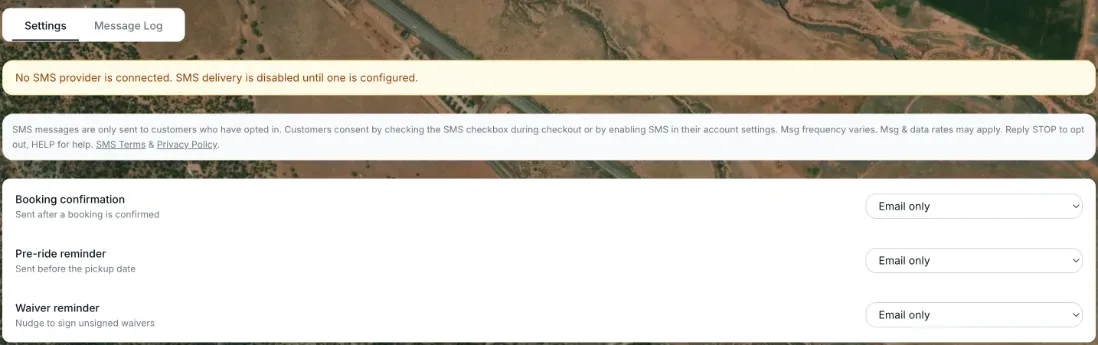 The amber "No SMS provider is connected" banner above the greyed-out Email/SMS/Both choices
How it works
An amber banner at the top of the page reads: "No SMS provider is connected. SMS delivery is disabled until one is configured." Below it, each notification type still shows a choice of Email only, SMS only, or Both:
- Booking confirmation — sent when a booking is confirmed.
- Pre-ride reminder — sent 1–2 days before the booking's start date.
- Waiver reminder — sent once if a customer's waiver is still unsigned.
While no text provider is connected, these choices are greyed out and can't be changed — everything is delivered by email regardless of what's selected.
Good to know
- The Message Log will be empty until text messaging is turned on for your account — see Every text message Renta has sent or received.
- Nothing you can do on this page turns text messages on yourself; it requires a text provider being connected on Renta's side first.
Related articles
- Common questions: customer emails, sender name, and text messagesQuick answers about the automated emails Renta sends your customers, how to change the sender name and reply address, how to edit or switch off each email, and why text messages are not available yet.
- Your customer email templatesWrite and switch on the automated emails customers get (confirmations, reminders, receipts, review requests), see when each last went out, and preview them.
- The "From" name and reply-to address on your emailsSet what customers see as the sender name and reply-to address when Renta emails them on your behalf.
- Staff alerts: the notification bell and what each alert meansThe bell at the top of the admin, the pop-up and email that come with each alert, and what every alert (new booking, inquiry, overdue return, driver runs, kiosk alerts and more) means.
- Sending a customer a payment linkCreate a secure Stripe payment link for a booking and send it by email, so a customer can pay without you taking their card over the phone.
Still stuck? Ask the chat.
Was this helpful?