Setting default waiver values (age, fees, deposit language)
Fill-in-the-blank values, like minimum age or late fee, that appear automatically inside every waiver.
Where to find it
Settings → Waiver terms
Your waiver text uses placeholders — like a minimum age or a late fee — so you don't have to retype the same numbers into every waiver template. Waiver Policy is where you set those values once.
Where to find it
Settings → Waiver terms
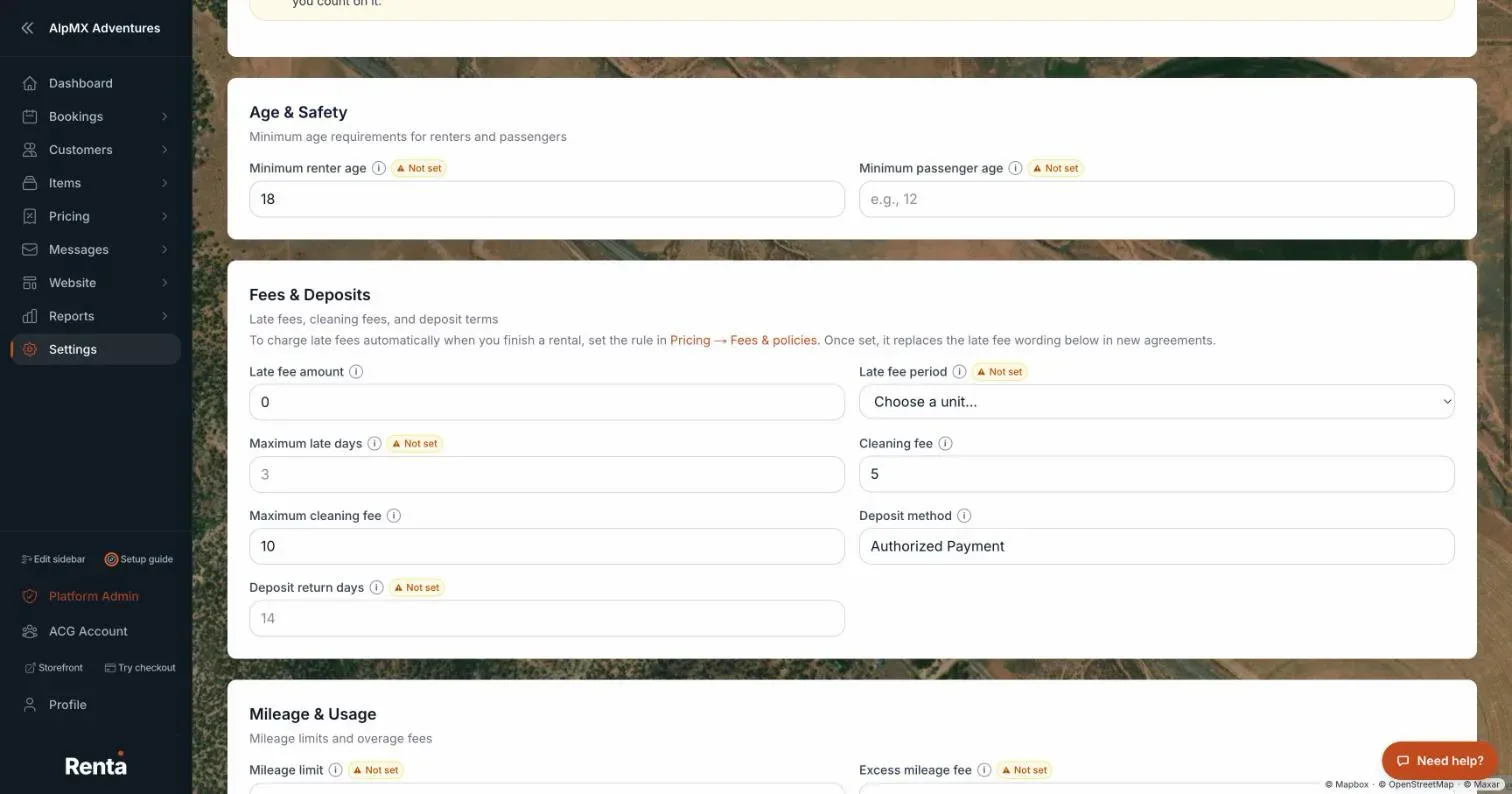 The Waiver Policy page with Age & Safety and Fees & Deposits sections
How it works
Age & Safety:
- Minimum renter age — default 18, any number 0 or higher.
- Minimum passenger age — blank by default; sets a separate minimum for passengers.
Fees & Deposits:
- Late fee amount — free text, e.g. "$50." It only fills in the wording of the waiver; it does not set or charge a late fee.
- Late fee period — choose Per hour or Per day; this pairs with the late fee amount so the waiver reads "$50 per hour." The wording is added for you, so you only pick the unit.
- Maximum late days — the most days late that your late-fee terms cover.
- Cleaning fee — free text, e.g. "$150."
- Maximum cleaning fee — a cap on total cleaning fees charged, e.g. "$500."
- Deposit method — free text describing how deposits are handled, e.g. "Credit card hold."
- Deposit return days — how many days after return the deposit is given back, e.g. "14."
Mileage & Usage:
- Mileage limit — free text, e.g. "100 miles/day."
- Excess mileage fee — free text, e.g. "$0.50/mile."
Cancellation:
- Full refund hours before pickup — how many hours before pickup a customer can still cancel for a full refund, e.g. "48."
- Partial refund hours before pickup — how many hours before pickup a customer can still cancel for a partial refund, e.g. "24."
Operations:
- Rate period description — free text describing your rental period, e.g. "24-hour period."
- Operating area description — free text describing where you operate, e.g. "Within 50 miles of pickup location."
Example
If you set Minimum renter age to 21 and Late fee amount to "$25" with a Late fee period of "Per hour," every waiver that uses those placeholders shows "You must be 21 or older to rent" and "$25 per hour" automatically — no need to update each template by hand.
Good to know
These values are business-wide, and they feed directly into the placeholders inside Building your waiver forms — a blank field here shows up as a blank spot on the signed waiver.
- The late fee wording here is separate from the rule that actually charges a late fee when you finish a rental. That rule is set under Pricing → Fees & policies, in the Late return fee card (the page links to it from the Fees & Deposits section).
Related articles
- Waivers: common questionsQuick answers on tracking who has signed, sending and resending waiver links, signing in person, building waiver templates, the default waiver, selfie and ID photo requirements, and waiver policy values like minimum age.
- Tracking which bookings still need a signed waiverSee upcoming pickups without a signed waiver, and send or resend the waiver link.
- Rental agreements and contracts - how customers signRenta has no separate contract feature. You write your rental agreement as a waiver template, and customers sign it online, from an emailed link, at your counter or at the kiosk. The signed copy is kept on the booking as a record and a PDF.
- Common questions: creating and editing a fleet itemQuick answers on adding and editing a rental item, from photos, SKU, tags, rates, packages, discounts, deposit and waivers to Live or Draft, Save as Template, clone and delete.
- Common questions: Renta's fee, card fees, taxes and extra chargesShort answers on what Renta charges you, what your customer pays on top of your price, sales tax, the security deposit, damage and late fees, cancellation fees, and switching plans.
Still stuck? Ask the chat.
Was this helpful?