Sending Renta events to another system (webhooks)
Get a signed message sent to your own address automatically whenever something happens in Renta, like a new booking.
Where to find it
Settings → Integrations → Webhooks section
A webhook is the opposite of an API key. Instead of another tool asking Renta "anything new?", Renta sends a signed message to an address you choose the moment something happens. Use it to feed Zapier, a spreadsheet script, or your own software.
Where to find it
Settings → Integrations, the Webhooks section. Owners and Managers only.
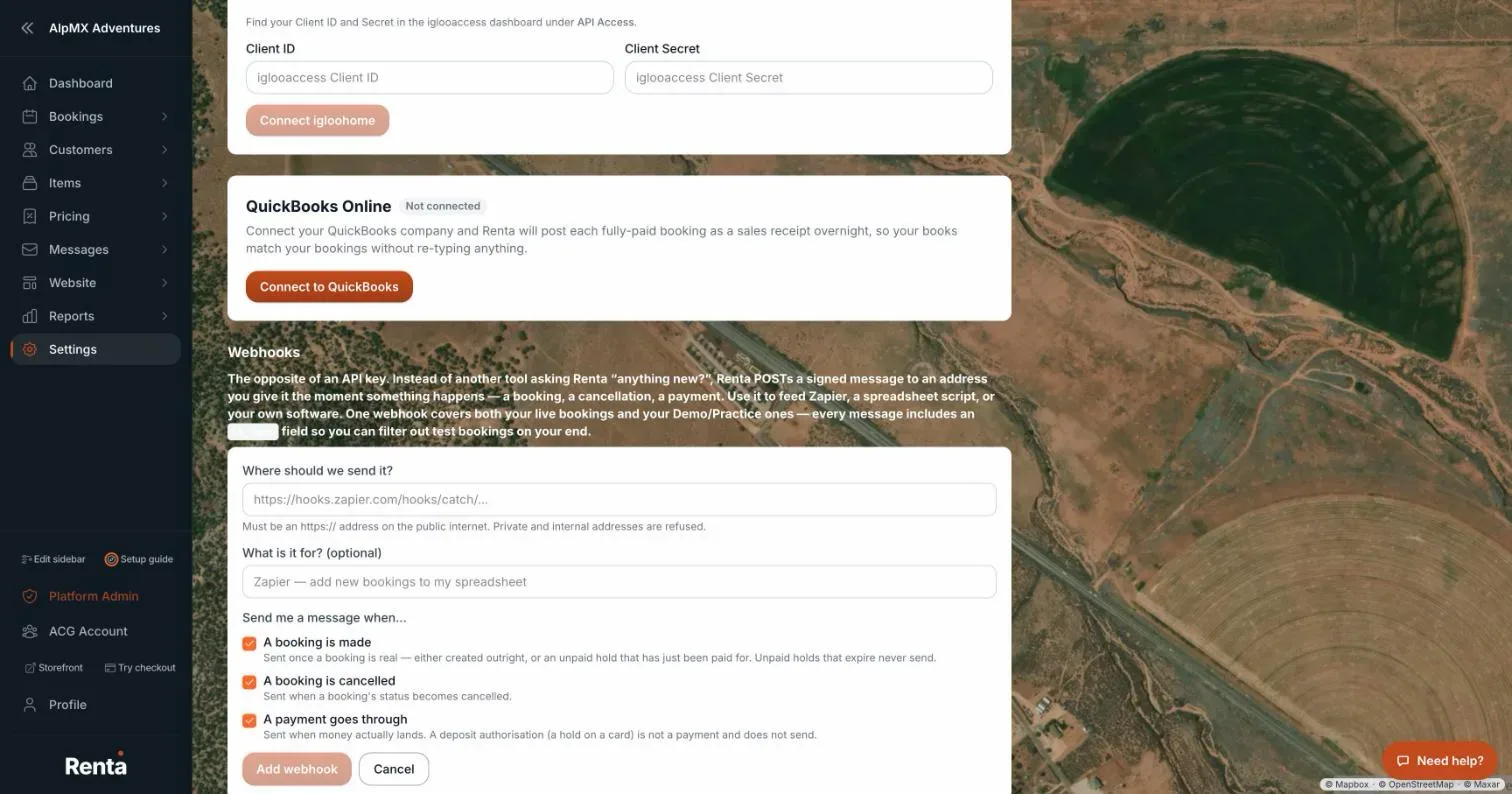 The Webhooks section with Add webhook button and event type checkboxes
How it works
- Add a webhook — opens the form. Where should we send it? takes an https:// address on the public internet (private and internal addresses are refused). What is it for? (optional) is a note to yourself. Tick the events and press Add webhook.
- Events — "A booking is made" (sent once a booking is real, not for unpaid holds that expire), "A booking is cancelled", and "A payment goes through" (a deposit hold on a card is not a payment).
- Each webhook shows its events and "last delivered [date]" or "never delivered yet". Turn off or Turn back on pauses it, Show signing secret reveals the secret that proves a message came from Renta, Recent deliveries lists attempts, and delete removes it ("Delete this webhook?").
- Switched off automatically — after 20 failed deliveries in a row Renta turns the webhook off and shows the reason. Fix your address, then press Turn back on.
- One webhook covers both live bookings and practice ones. Every message carries an `is_demo` field so you can ignore test bookings.
Example
You want a spreadsheet row for each new booking. Add a webhook pointing at your automation address, tick "A booking is made", and every real booking posts a message there.
Good to know
- There is no test button. Use Recent deliveries to check that messages are arriving.
- For more quick answers see Common questions: QuickBooks, Google, smart locks, AI assistants, API keys, and webhooks.
Related articles
- Connecting RideDogLink your RideDog account to see your GPS trackers and live vehicle locations right inside your Renta dashboard.
- Connecting QuickBooks OnlinePost your paid bookings and refunds to QuickBooks Online automatically, with sales tax recorded as money owed to the tax office.
- Connecting smart locks (igloohome)Connect your igloohome (iglooaccess) account so Renta can issue self-expiring door codes for bookings.
- Connecting an AI assistant (Claude, ChatGPT and other MCP tools)Let your own AI assistant, such as Claude or ChatGPT, read and (if you allow it) change your Renta data, using a step-by-step connect wizard or a key you create yourself, and choose exactly what it may do.
- Connecting Google Search Console, Analytics, and your Business ProfileLink Google so your search traffic and site performance show up in Renta, with an optional Business Profile connection for reviews and location data.
Still stuck? Ask the chat.
Was this helpful?