Turning the Renta Help Chat widget on or off
What the "Need help?" chat bubble in your admin answers and how to reach a person from it, and how to switch it off for good.
Where to find it
The Need help? bubble (bottom-right of every admin page); on/off switch under Settings → Advanced
The Need help? bubble is Renta's own assistant. You ask a question about using Renta, such as "how do I set up a multi-day discount?", and it answers. It is only for you and your team inside the admin. Your customers never see it.
Where to find it
- The bubble: a Need help? button in the bottom-right corner of every admin page. Click it to open the chat.
- The on/off switch: open Settings, scroll to the bottom and click Advanced to expand it, then find the Renta help chat card with the Show the help chat bubble checkbox.
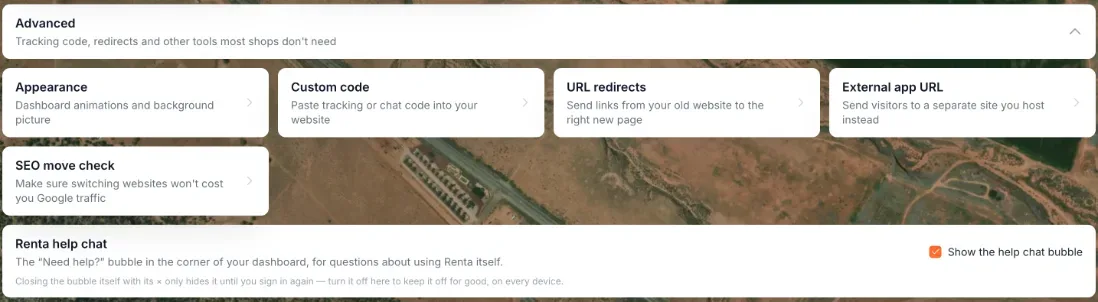 The Renta Help Chat checkbox at the bottom of the Settings page
What it can answer
It answers questions about using Renta: where a setting is, what a button does, how to set something up. It answers only from the pages of this Help Center and links to the page it used.
It does not look up your bookings, customers or payments, and it cannot change anything, so it cannot tell you why one particular booking looks the way it does. For that, open the booking and see the relevant help page.
Each shop can ask up to 30 questions an hour and 100 a day. Past that, the chat says so and points you to the Help Center or Renta support.
How to reach a person
If the Help Center does not cover your question, the chat says so and gives you Renta support's address, support@getrenta.io. Email it to reach a person.
Other ways to get help:
- Open the Help Center itself from the profile menu at the bottom of the left sidebar. It opens in a new tab.
- During the guided setup tour, the Stuck? Ask for help button opens the chat with a message such as "I'm stuck on setup step: (step name)" ready to send, and shows "Help chat opened — press Send to ask about this step". If the chat is switched off you see "The help chat isn't available right now — check Settings → Advanced, or email support@getrenta.io".
Closing and turning it off
- The × inside the bubble hides it. The card in Settings says this hides it "until you sign in again".
- To keep it off for good, on every device, untick Show the help chat bubble on the Renta Help Chat card. It saves the moment you click, with no Save button. If it cannot save you will see "Couldn't save — try again.", "Failed to save this setting." or "Tenant mismatch — please reload and try again."
The card reads: "The 'Need help?' bubble in the corner of your dashboard, for questions about using Renta itself." The bubble is on by default for every business once Renta has switched it on. If the card is not there at all, the help bubble has not been switched on yet.
Privacy and who sees it
Anyone who signs in to your admin sees the bubble, whatever their role. The chat runs inside Renta. Your conversation is kept in your own browser, so it is still there after you close the panel or reload the page, and other team members (or another shop on the same computer) do not see it. Renta does not save it.
Example
Your new hire opens Maintenance for the first time and asks the bubble "what does Due Soon mean?" It explains, using The Maintenance screen, and links to that page.
Good to know
- This is not the chat bubble on your public website. That one answers your customers and is set up under Website AI assistant.
- If you switch it off, nothing else changes. You can still use the Help Center directly.
Related articles
- Common questions: business details and general settingsQuick answers about business details and the settings that used to sit on the old General page - business name, timezone, contact details (Settings → Business profile), tax rate and currency (Pricing), late return alerts and the weekly email (Messages), the Help Chat bubble, and why some Settings cards are missing.
- Setting your business contact detailsThe email, phone, and address shown to customers on waivers and used to set up your Stripe payment profile.
- Getting a Monday morning summary emailTurn on a weekly email digest of your revenue, bookings, and key metrics sent to your inbox.
- Getting notified when a rental is overdueAlert your team, and optionally the customer, once a booking passes its return time by a grace period you set.
- Whether unpaid bookings block your calendarDecide if an unpaid pending booking reserves the item for that customer, or lets someone else book it in the meantime.
Still stuck? Ask the chat.
Was this helpful?