Getting notified when a rental is overdue
Alert your team, and optionally the customer, once a booking passes its return time by a grace period you set.
Where to find it
Messages → Automated messages → Alerts & reports card → Late return alerts
Renta can notify your team the moment a rental runs past its scheduled return time, and optionally send the customer a courtesy reminder too.
Where to find it
Messages → Automated messages, then scroll to the Alerts & reports card below the template list. The late return alert options are at the top of it. Press Save at the bottom of that card after changing anything.
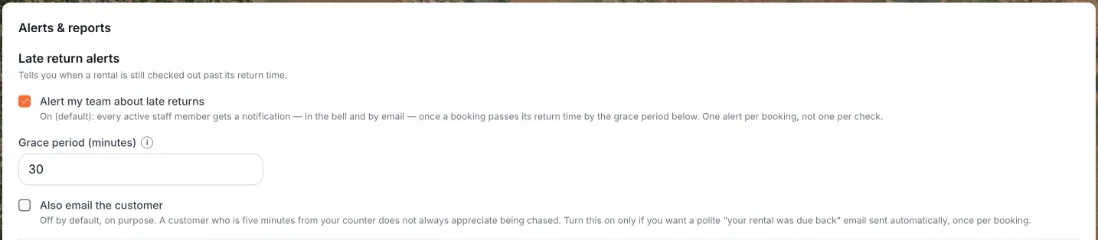 The Late return alerts fields in the Alerts & reports card
How it works
- Alert my team about late returns — on by default. When on, every active staff member gets a notification (in the bell icon and by email) once a booking passes its return time by the grace period below. It's one alert per booking, not a repeating alert.
- Grace period (minutes) — how long after the scheduled return time a rental is allowed before it counts as late. Default is 30 minutes. Can be set from 0 to 10,080 minutes (7 days). Set it to 0 to be alerted the instant the return time passes. Only usable when the alert toggle above is on.
- Also email the customer — off by default. When on, sends the customer a "your rental was due back" email as well as alerting your team. Off by design, since not every business wants to nudge customers directly.
Example
If a jet ski is due back at 2:00 PM and your grace period is 30 minutes, your team gets notified at 2:30 PM if it hasn't been checked in yet.
Good to know
- Turning off "Alert my team about late returns" also disables the Grace period and customer email options below it.
- This is separate from the late return fee, which is a charge you set up under Pricing → Fees & policies (the Late return fee card). The alert is only a notification and never charges anything.
Related articles
- Common questions: business details and general settingsQuick answers about business details and the settings that used to sit on the old General page - business name, timezone, contact details (Settings → Business profile), tax rate and currency (Pricing), late return alerts and the weekly email (Messages), the Help Chat bubble, and why some Settings cards are missing.
- Setting your business contact detailsThe email, phone, and address shown to customers on waivers and used to set up your Stripe payment profile.
- Getting a Monday morning summary emailTurn on a weekly email digest of your revenue, bookings, and key metrics sent to your inbox.
- Whether unpaid bookings block your calendarDecide if an unpaid pending booking reserves the item for that customer, or lets someone else book it in the meantime.
- Turning the Renta Help Chat widget on or offWhat the "Need help?" chat bubble in your admin answers and how to reach a person from it, and how to switch it off for good.
Still stuck? Ask the chat.
Was this helpful?