Getting a Monday morning summary email
Turn on a weekly email digest of your revenue, bookings, and key metrics sent to your inbox.
Where to find it
Messages → Automated messages → Alerts & reports card → Weekly Reports Digest
The Weekly Reports Digest sends you a summary email each Monday morning with your revenue, bookings, and key metrics from the past week.
Where to find it
Messages → Automated messages, then scroll to the Alerts & reports card below the template list and find Weekly Reports Digest. Press Save at the bottom of that card after switching it on.
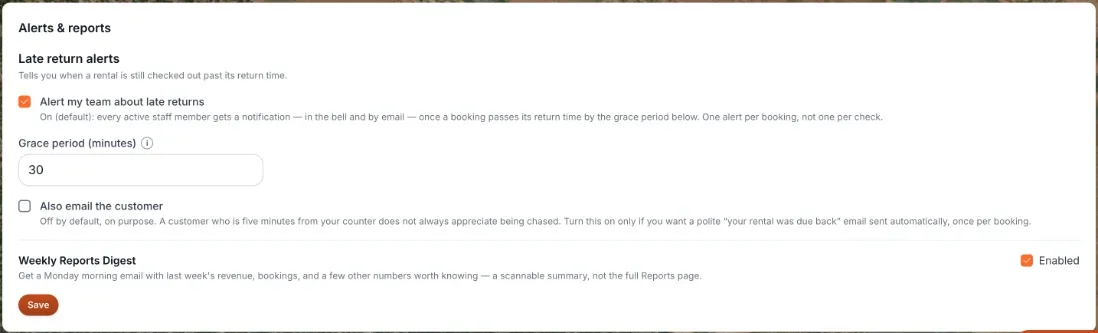 The Weekly Reports Digest toggle
How it works
- Enabled — off by default. Turn this on to start receiving the Monday morning digest email. It's a single toggle with no further configuration.
Example
If you turn this on, every Monday morning you'll get an email summarizing how many bookings you took, how much revenue came in, and other key numbers from the previous week — without having to open the dashboard.
Good to know
Related articles
- Common questions: business details and general settingsQuick answers about business details and the settings that used to sit on the old General page - business name, timezone, contact details (Settings → Business profile), tax rate and currency (Pricing), late return alerts and the weekly email (Messages), the Help Chat bubble, and why some Settings cards are missing.
- Getting notified when a rental is overdueAlert your team, and optionally the customer, once a booking passes its return time by a grace period you set.
- Whether unpaid bookings block your calendarDecide if an unpaid pending booking reserves the item for that customer, or lets someone else book it in the meantime.
- Turning the Renta Help Chat widget on or offWhat the "Need help?" chat bubble in your admin answers and how to reach a person from it, and how to switch it off for good.
- Letting customers pick up equipment the evening beforeHow evening-before pickup works, and where the older shop-wide hours and per-item tick box fit now that templates exist.
Still stuck? Ask the chat.
Was this helpful?