Creating a booking yourself (front-desk / phone booking)
Walk a walk-in or phone customer through a booking yourself, from picking items to collecting payment.
Where to find it
Bookings → New booking
Creating a booking yourself lets you take a reservation over the phone or at the counter, the same way a customer would book online, but with you driving.
Where to find it
Bookings → New booking button.
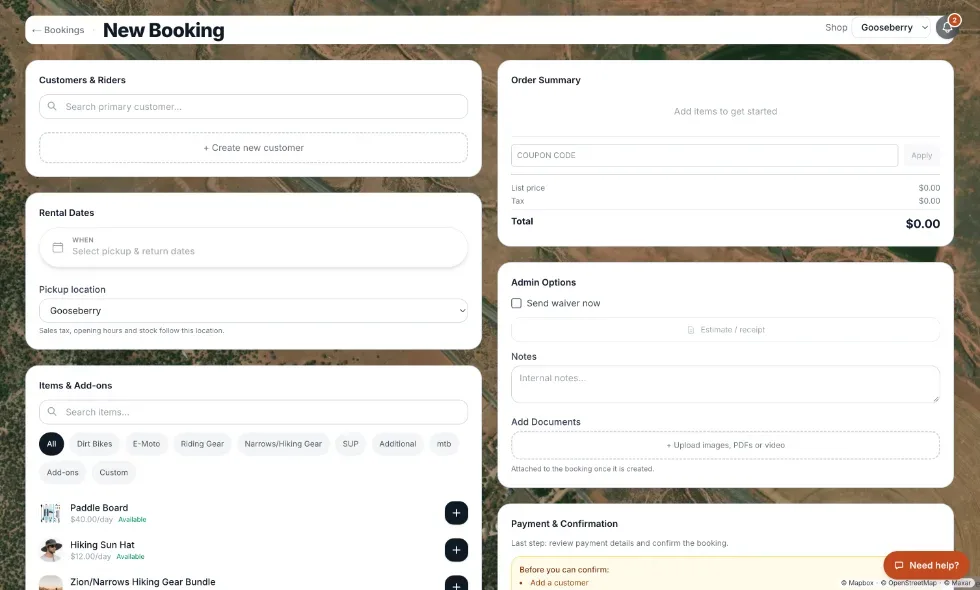 The New Booking form
How it works
1. Customers & Riders — search for the primary customer (or add a new one), and add any other riders. 2. Item selection — search your fleet, pick any variant options, and set quantity. 3. Rental Dates — a calendar where you can click separate days or drag a stretch, with start and end times. Unavailable dates are grayed out with a tooltip explaining why. See Booking separate days and the overnight rule. 4. Pricing breakdown — an itemized total shown automatically, including deposit and taxes. 5. Payment — choose when to collect (now, before pickup, on a specific date, or at pickup) and how: a card (Card / Charge card), Cash, Other, or Send link. See Sending a customer a payment link.
A deposit hold created this way defaults to auto-releasing 7 days after the return date unless you change it.
If you have more than one shop location
A Pickup location menu appears under Rental Dates. Sales tax, opening hours, and stock follow the location you choose. With a single location the menu is hidden.
Delivery
In the delivery calculator, the starting address (Origin) can be typed, picked from a menu of saved origins (Choose a saved origin), or saved with the star button for next time.
Example
A walk-in customer wants to rent gear today with cash. Search or add them as a customer, add the item, set today's dates, choose Cash as the payment method, and skip the card step entirely.
Good to know
- The form saves your progress in your browser for about 15 minutes. If it closes partway through, reopening New booking shows an "Unsaved booking draft" note with a Restore button; the × beside it discards the draft.
- If the item is a bundle (several items sold together), you'll be asked to pick which specific components to include.
- There is no "Duplicate booking" or "Copy booking" button. To repeat a customer's earlier booking, start a new one here and pick the same customer, items and dates again.
Related articles
- Managing bookings: common questionsQuick answers on finding a booking, creating one, blocking dates, the Start/Finish/Cancel buttons, refunds, discounts, rescheduling, statuses, and what customers can change themselves.
- Finding a bookingOn a computer, search above the availability calendar to jump to a booking; on a phone, search and filter a list by status.
- Common questions: refundsQuick answers on sending money back to a customer, why a refund has not gone out yet, how much you can refund, what happens to Renta's fee, gift cards and cash, and the difference between refunding and releasing a deposit.
- Booking statuses explainedWhat the status badges mean (Pending, Confirmed, Active, Returned, Cancelled, Expired), and what the calendar colours mean.
- Changing a booking's datesMove a booking's pickup or return, see the new price first, and know what happens to add-ons, the deposit hold, typed prices, and past dates.
Still stuck? Ask the chat.
Was this helpful?