Setting your business name, timezone, tax rate, and currency
The core details that appear on bookings, receipts, and waivers — your business name, timezone, sales tax rate, and currency.
Where to find it
Settings → Business profile → Business details (name, timezone); Pricing → Fees & policies → Tax, currency & pickup timing (tax rate, currency)
Your Business name, Timezone, Tax rate (%), and Currency are the core details Renta uses on every booking, receipt, and waiver your customers see.
Where to find it
These live on two pages:
- Business name and Timezone: Settings → Business profile, in the Business details card. The Contact & address card on the same page holds your business contact details. Press Save at the bottom.
- Tax rate (%) and Currency: Pricing → Fees & policies, in the Tax, currency & pickup timing card (it has its own Save button). The night-before pickup window and the pending-bookings switch are in the same card. Late return alerts and the weekly report toggle moved to Messages → Automated messages.
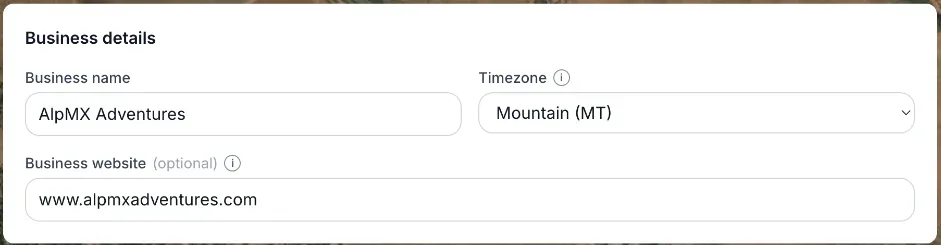 The Business details card with Business name and Timezone, and the Tax, currency & pickup timing card
How it works
- Business name — the name shown to customers on bookings and documents. No length limit.
- Timezone — controls what time customers see for pickup and return. Default is America/Phoenix. You can pick any major US timezone (Eastern, Central, Mountain, Mountain without Daylight Saving, Pacific, Alaska, Hawaii, Atlantic/Puerto Rico) or UTC for other regions.
- Tax rate (%) — the sales tax applied to bookings and admin charges. Default is 0%. Must be between 0 and 100, with two decimal places allowed (like 8.25%).
- Currency — the currency used on new bookings going forward. Default is USD; the list also has CAD, EUR, GBP, AUD, NZD, CHF, SEK, NOK, DKK, and MXN. Changing this does not re-price bookings that already exist.
Example
If you set Tax rate to 8.5% and Timezone to Pacific, a customer booking a jet ski for $100 sees an 8.5% tax line added at checkout, and the pickup time is shown in Pacific time no matter where the customer is browsing from.
Good to know
- Changing Currency only affects bookings made after the change — it will not convert or re-price anything already booked.
- A Location can have its own timezone that overrides this one for that specific pickup spot.
- Tax Rate here is the default for the whole business. A Location can have its own sales tax rate; if you leave it blank, the location uses this rate. It is not set per item.
- The Night-before pickup hours in the Tax, currency & pickup timing card is covered in Letting customers pick up equipment the evening before.
Related articles
- Common questions: business details and general settingsQuick answers about business details and the settings that used to sit on the old General page - business name, timezone, contact details (Settings → Business profile), tax rate and currency (Pricing), late return alerts and the weekly email (Messages), the Help Chat bubble, and why some Settings cards are missing.
- Whether unpaid bookings block your calendarDecide if an unpaid pending booking reserves the item for that customer, or lets someone else book it in the meantime.
- Turning the Renta Help Chat widget on or offWhat the "Need help?" chat bubble in your admin answers and how to reach a person from it, and how to switch it off for good.
- Common questions: how a price is calculatedQuick answers on how a booking total is built, why it differs from the price on the item, and how tax, rounding, the Renta booking fee, hand-typed prices and extra charges work.
- Common questions: Renta's fee, card fees, taxes and extra chargesShort answers on what Renta charges you, what your customer pays on top of your price, sales tax, the security deposit, damage and late fees, cancellation fees, and switching plans.
Still stuck? Ask the chat.
Was this helpful?