A customer's full profile
Contact info, lifetime spend, booking count, and internal tags and notes, all on one page.
Where to find it
Customers → open a customer
Opening a customer from the list shows their full record: contact details, how much they've spent, and internal notes your staff can see (but the customer never does).
Where to find it
Customers → click a customer's name
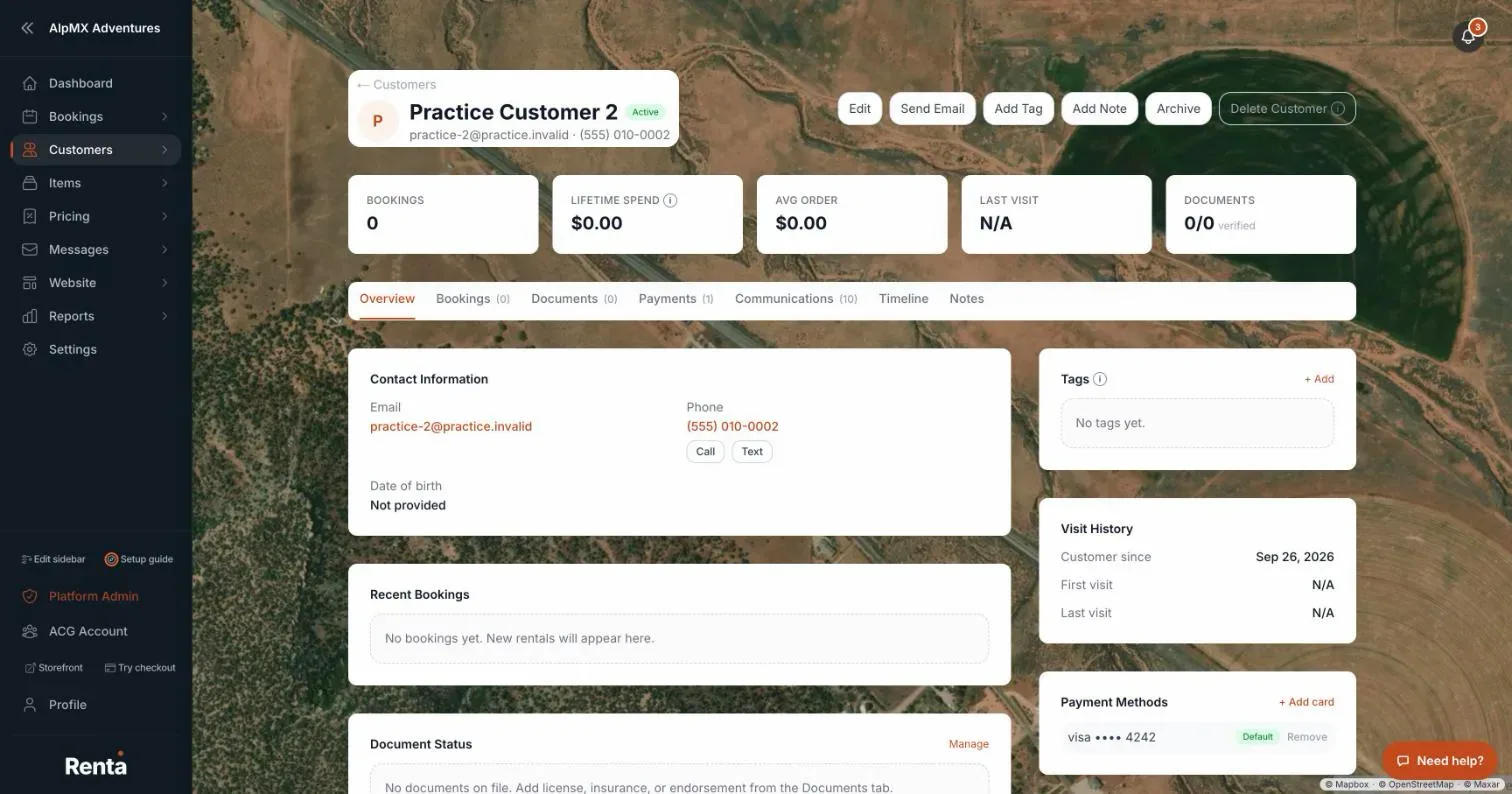 The Overview tab of a customer's profile
How it works
The profile has seven tabs: Overview, Bookings, Documents, Payments, Communications, Timeline, and Notes.
At the top, a row of numbers shows Bookings, Lifetime Spend, Avg Order, Last visit, and Documents (how many are verified). Lifetime Spend is what the customer actually paid on confirmed, active, and completed bookings, minus refunds, not counting security deposit holds. Cancelled bookings aren't counted.
Buttons next to the name: Edit, Send Email (only if the customer has an email), Add Tag, Add Note, Archive / Unarchive, and Delete Customer.
On the Overview tab:
- Contact Information — the email is a link that opens your email app. The phone number is a link too, with Call and Text buttons beside it. Date of birth is shown here.
- Recent Bookings, Document Status, Tags, Visit History (Customer since, First visit, Last visit), Payment Methods, and Flags (such as VIP or Banned) when the customer has any.
Click Edit to change Full Name, Email, Phone, Billing Address, Date of Birth, or Notes, then Save changes. You can also use the Edit button on each row of the Customers list.
The Communications tab
Every email sent to or received from this customer, newest first (up to the latest 500). Each row shows the subject, whether it was sent or received, what kind it was (for example Booking confirmation, Pre-ride reminder, Payment receipt, Custom email, Inbox email, or Inbox reply), the date and time, and a status label: Sent, Delivered, Opened, Clicked, Bounced, Failed, or Received. It includes Renta's automatic emails and emails from the two-way inbox; a subject from the inbox opens that conversation. If nothing has been sent, it says "No emails sent to this customer yet."
Example
A jet ski shop owner opens a customer who has completed five bookings and spent $2,400 total. The top row shows Bookings: 5, Lifetime Spend: $2,400, and an Avg Order of $480 — all calculated for you, nothing to enter.
Good to know
- Emails you send yourself are covered in Emailing one customer directly.
- The other tabs cover: Storing a customer's ID and documents, Saved cards on a customer's account, and Internal notes and photos on a customer.
- Archiving, unarchiving, and deleting a customer are covered in Archiving or deleting a customer record.
- The driver's license number lives in its own section — see Viewing a customer's driver's license number.
Related articles
- Finding and sorting customersSearch your customer list by name, filter by tag, and sort by spend, bookings, or last visit.
- Customer records: common questionsQuick answers on finding, adding, editing, tagging, archiving and deleting customers, what the profile tabs show, saved cards, documents, notes, driver's license numbers and exporting your customer list.
- Insurance - does Renta sell it, and how do I collect proof of insurance?Renta does not sell or manage insurance policies. You can ask customers to upload proof of their own insurance at checkout, store it on their record, and offer a paid add-on such as a damage waiver.
- Naming and describing a rental itemThe item's name, photos, SKU, category, and public description — the first tab when you create or edit an item.
- Setting your business contact detailsThe email, phone, and address shown to customers on waivers and used to set up your Stripe payment profile.
Still stuck? Ask the chat.
Was this helpful?